Common Challenges

Are you facing these challenges?

01

Challenges in LINE Response

Frequent interruptions to your workflow due to constant LINE replies and customer support...

02

Challenges in Strategy

Struggling every time to decide what content to send in your LINE broadcasts.

03

Challenges in Operations

LINE management relies too much on intuition... wishing for expert advice.

04

Challenges in Usability

Worried about being unable to master tools with overly complex operations and settings.

Troubled woman with comments

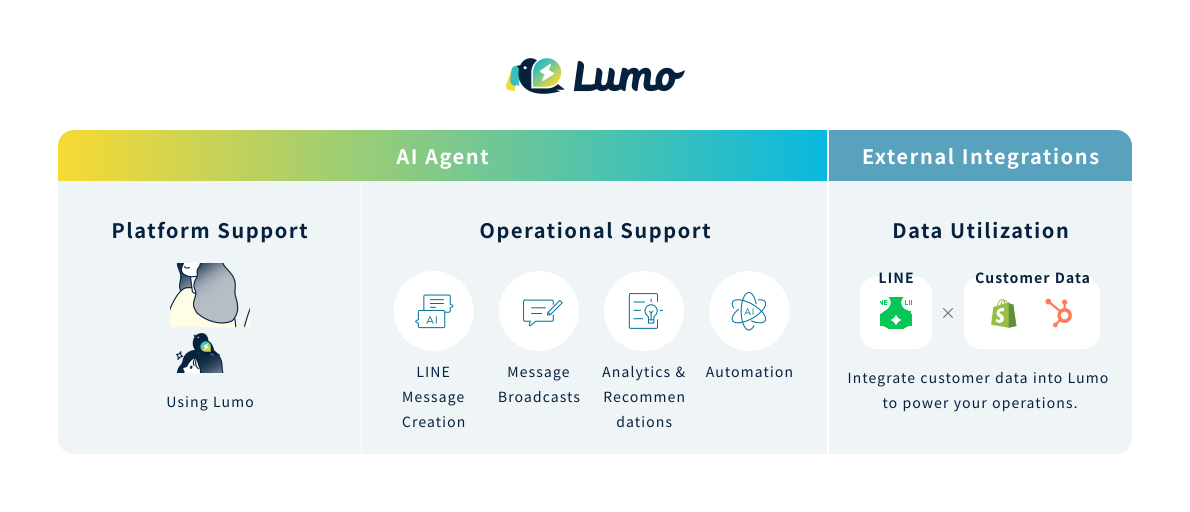
About Lumo

Leave everything from broadcasting and analytics
to operations to our AI Agent.

Free up your time to focus on what matters most—your customers.

  1. 機能 1

    Let AI Agents suggest the
    perfect message and timing.

    By analyzing historical data, our AI identifies the content and timing with the highest response rates. From target segments and message drafts to the ideal schedule—Lumo suggests it all. Stop relying on intuition and start delivering high-impact messages that truly resonate with your customers.

    Lumo admin message broadcast editor, showing delivery settings and an AI assistant preview.
    Lumo admin message broadcast editor, showing delivery settings and an AI assistant preview.
  2. 機能 2

    AI-powered Chat Generation: Effortless responses based on historical data.

    Based on your past LINE chat history, Lumo generates context-aware messages tailored to each customer's specific situation. By drastically reducing the time spent on manual replies, you can focus on building deeper relationships and tackling your core business priorities.

    Lumo’s LINE chat handling screen. The left panel shows AI-generated customer profile, message history, and insights; the center displays the LINE chat history; and the right panel shows customer information.
    Lumo’s LINE chat handling screen. The left panel shows AI-generated customer profile, message history, and insights; the center displays the LINE chat history; and the right panel shows customer information.
  3. 機能 3

    Cross-channel data analysis: Your strategic partner for the next move.

    Even vague concerns like "How should I use LINE?" or "Where do I start?" can be addressed by our AI Agent. Based on your delivery data and operational history, Lumo provides tailored suggestions—including broadcast planning and campaign ideas—that perfectly align with your current business needs.

    Lumo admin customer activity screen, with an AI-generated customer summary on the left and a timeline of activity history on the right.
    Lumo admin customer activity screen, with an AI-generated customer summary on the left and a timeline of activity history on the right.
  4. 機能 4

    Forget the manuals. Get real-time AI support for even the most complex operations.

    Stuck on a complex setting or tired of repetitive tasks? Just ask our AI Agent. Simply tell Lumo what you want to achieve, and it will guide you through everything—from designing auto-response workflows to mastering specific operations—step-by-step.

    Lumo auto-reply setup screen, where triggers and actions are configured in a flow.
    Lumo auto-reply setup screen, where triggers and actions are configured in a flow.

Feature List

Explore the powerful features
of Lumo

Messaging

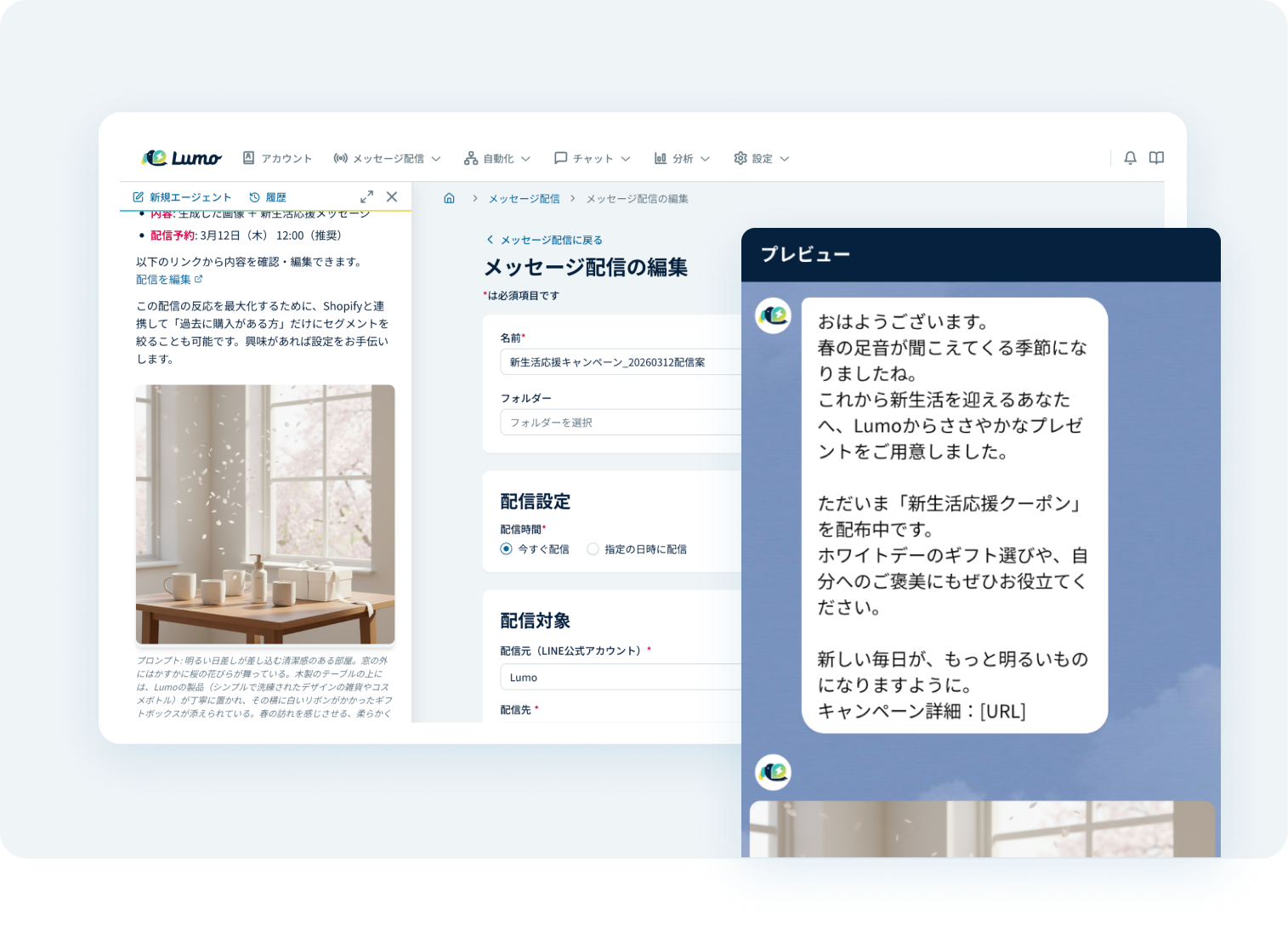
Lumo’s message broadcast editing screen in the admin panel, showing delivery settings and an AI assistant preview. 拡大する
Lumo’s message broadcast editing screen in the admin panel, showing delivery settings and an AI assistant preview.

AI-Powered Message Generation

The AI Agent makes this possible by generating the most suitable messages for each customer based on past campaign data. It also automates everything from suggesting the optimal delivery timing to preparing the distribution, significantly reducing the workload of messaging operations.
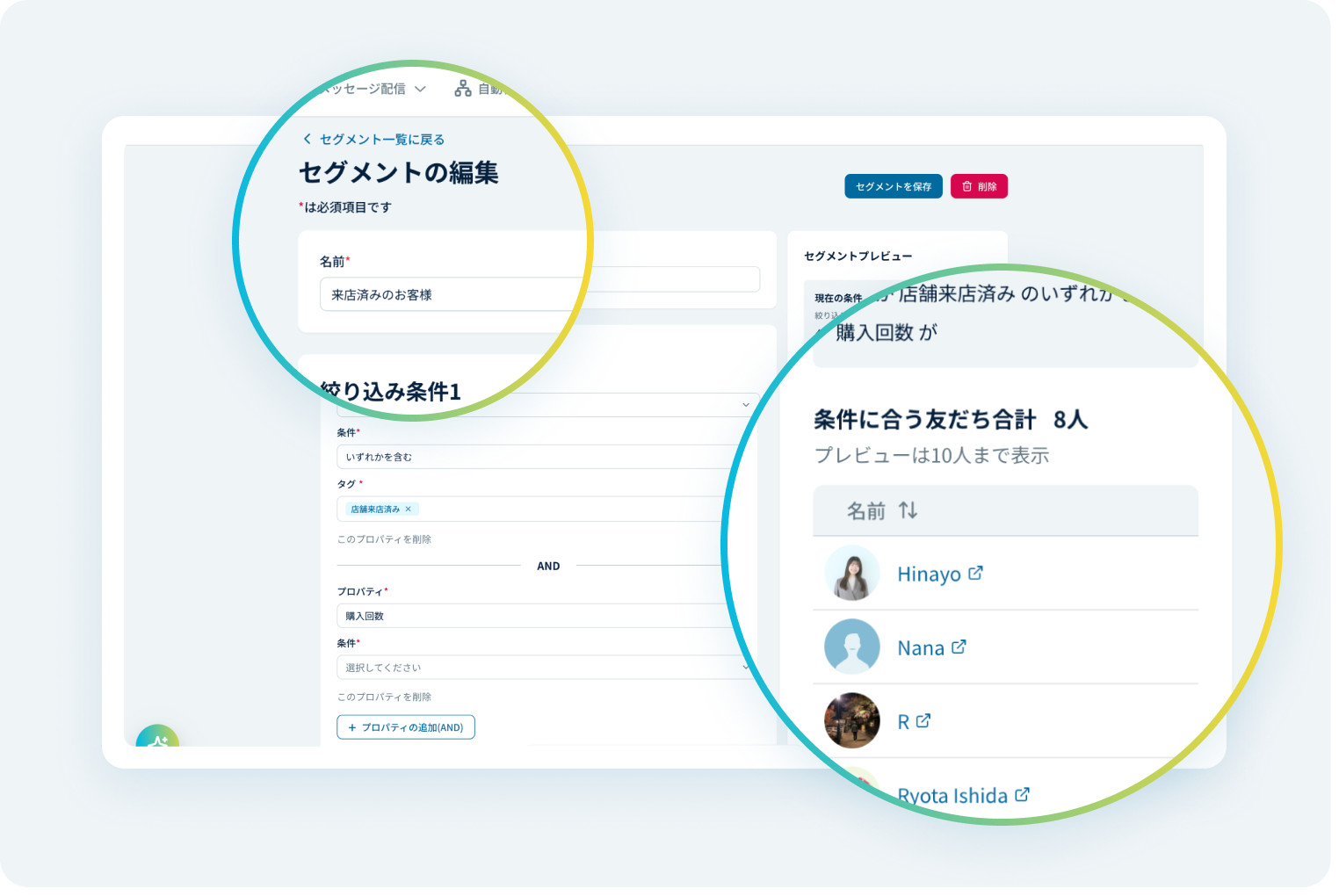
Lumo’s segment editing screen, displaying filter conditions and a preview of matching friends. 拡大する
Lumo’s segment editing screen, displaying filter conditions and a preview of matching friends.

Segmented Messaging with Customer Data

Leverage customer behavioral data, LINE interaction history, and tag management within Lumo to refine your target audience. Deliver messages tailored to each customer’s interests and context.
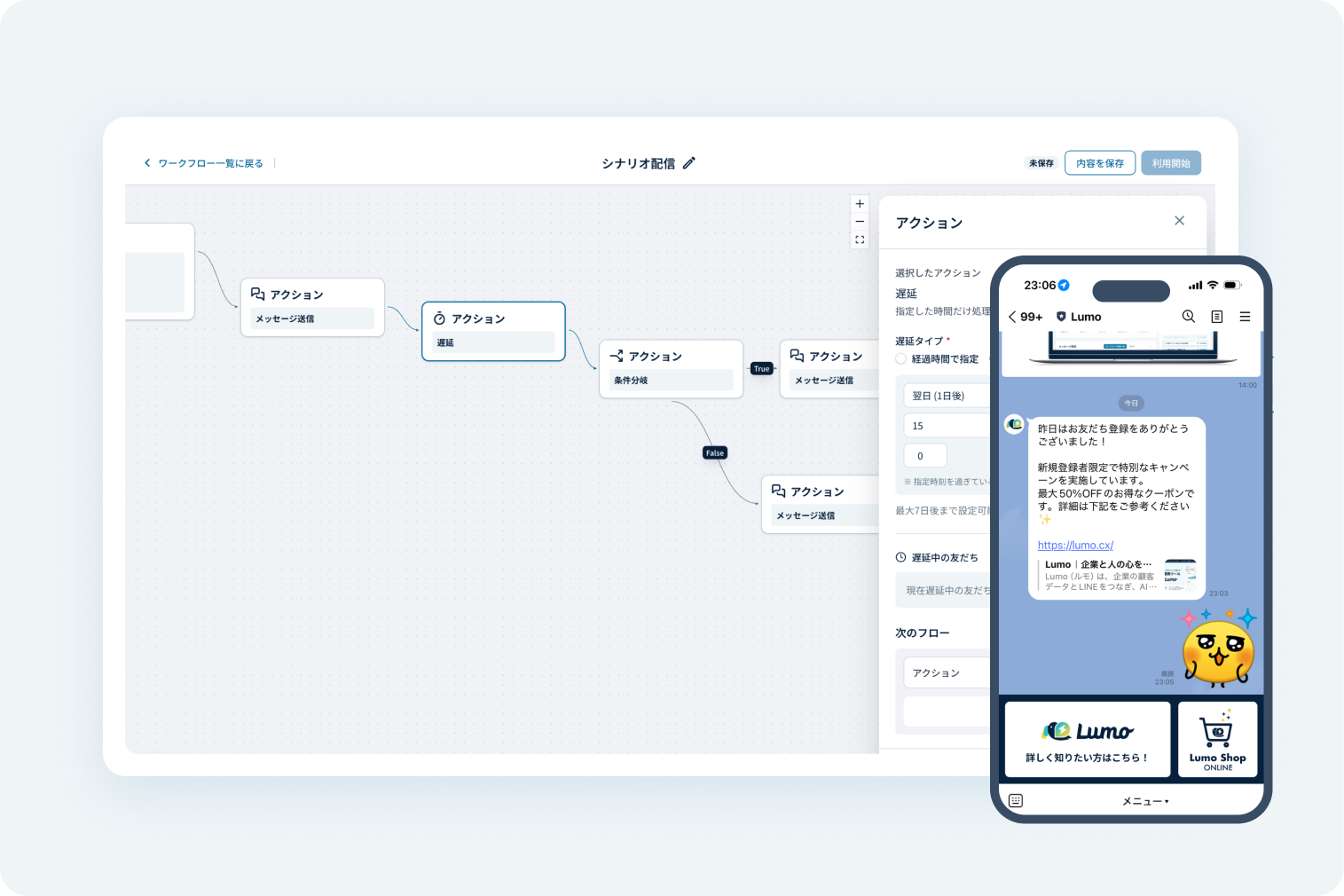
Lumo’s scenario-based messaging workflow editor, along with a mobile preview of the delivered LINE messages. 拡大する
Lumo’s scenario-based messaging workflow editor, along with a mobile preview of the delivered LINE messages.

Step delivery of messages

Automatically deliver messages based on user attributes and activity, such as browsing history. Streamline operations while enhancing the customer experience.
Automation

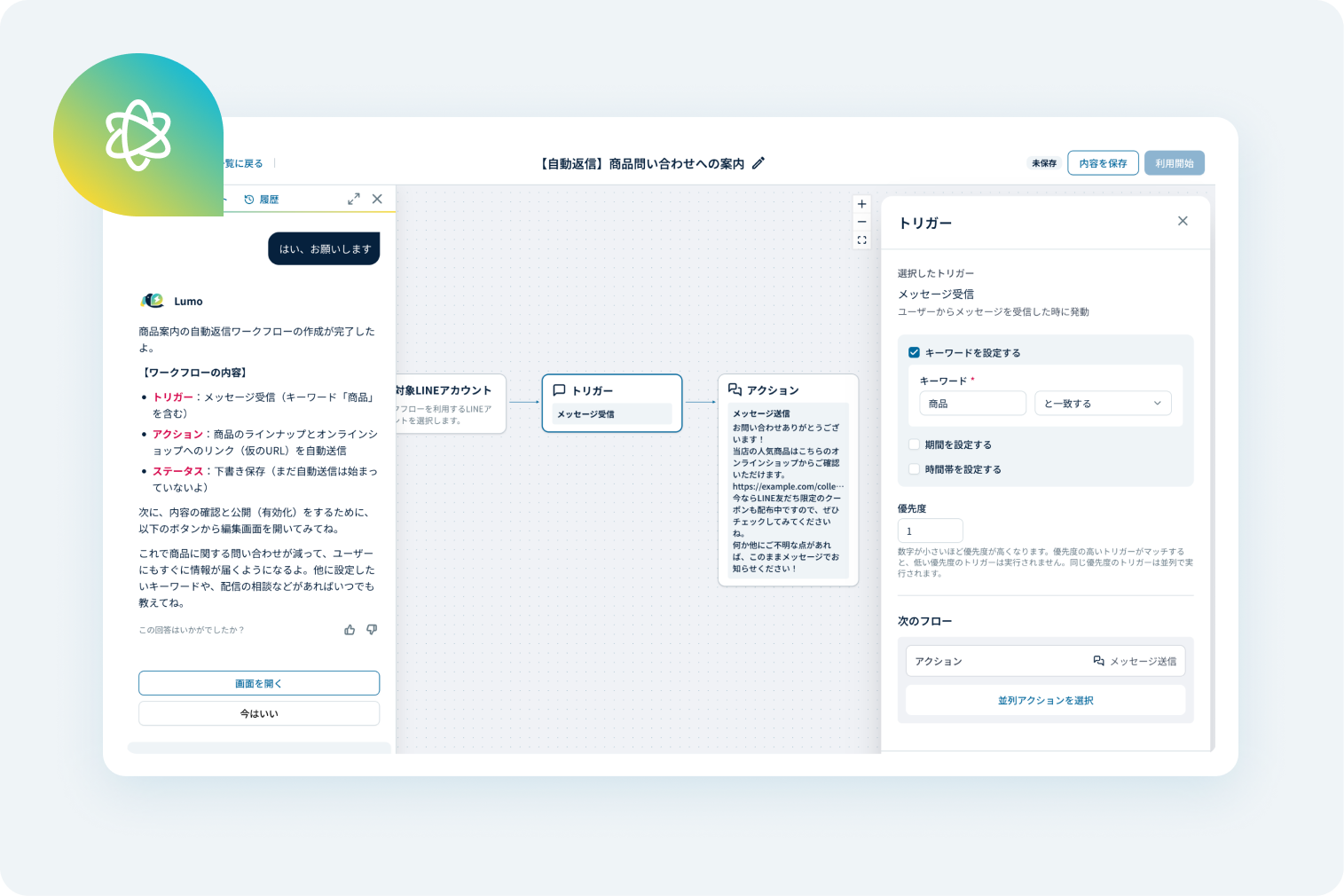
Lumo’s automated reply workflow editor, where triggers and actions are configured using a flow diagram. 拡大する
Lumo’s automated reply workflow editor, where triggers and actions are configured using a flow diagram.

AI-Powered Automation Assistant

AI guides you through workflow designs and operations for step messaging and auto-responses. Simply express your needs, and let AI streamline the setup process.
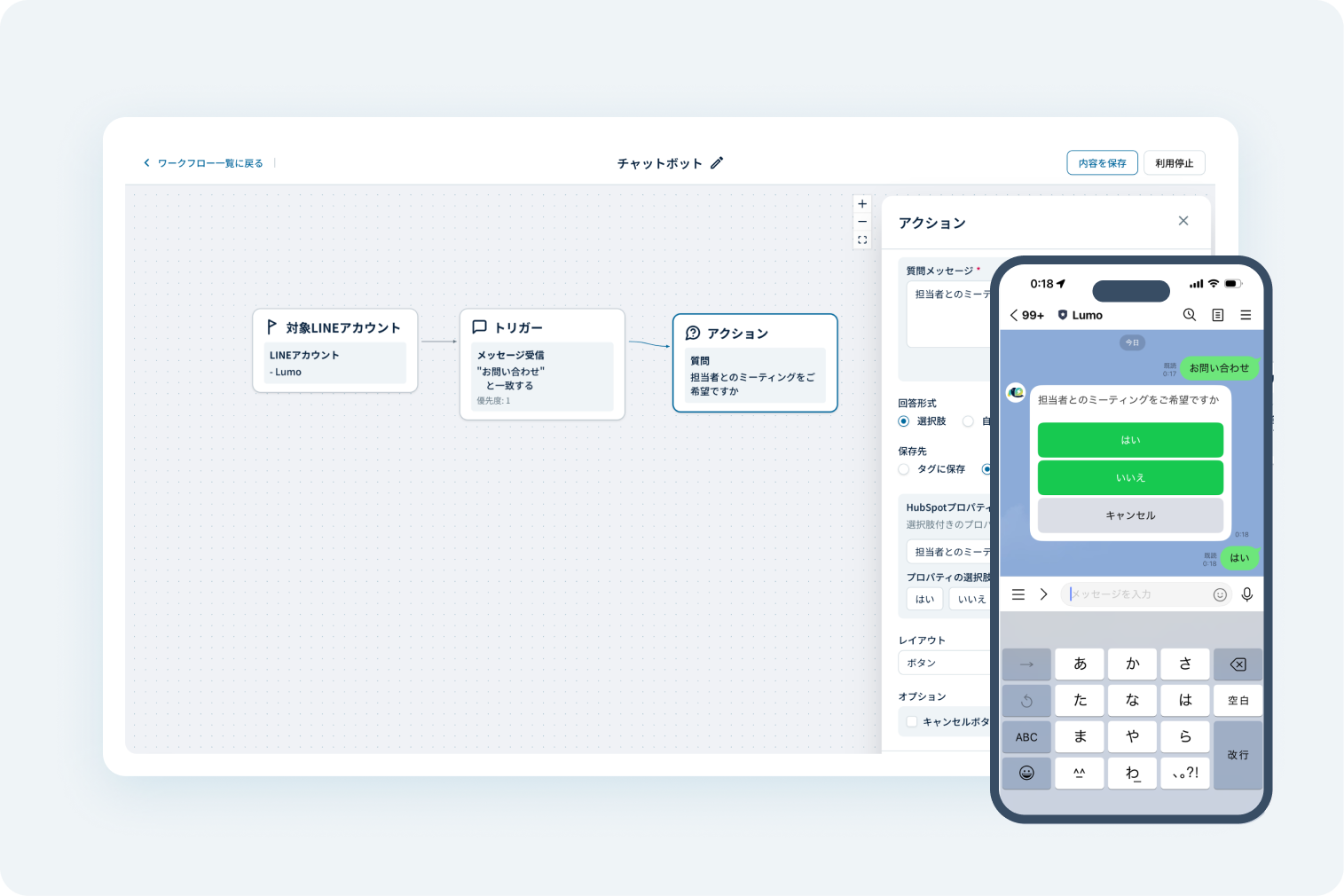
Lumo’s chatbot settings screen, along with a mobile preview of chatbot responses on LINE. 拡大する
Lumo’s chatbot settings screen, along with a mobile preview of chatbot responses on LINE.

Chatbot

Automate customer interactions with pre-set scenarios. Ensure rapid response times and consistent, stable operations for your brand.
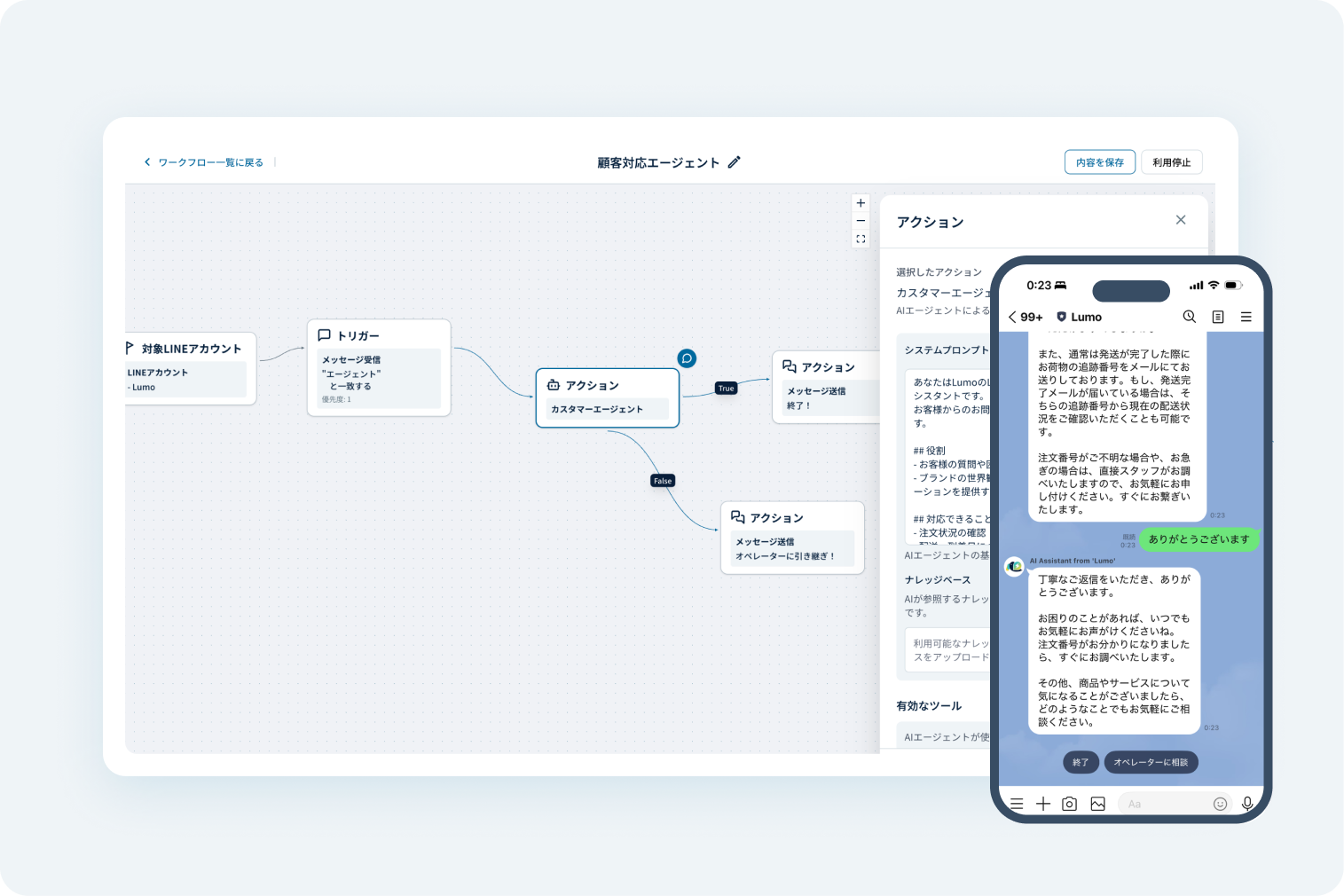
Lumo’s chatbot settings screen, along with a mobile preview of chatbot responses on LINE. 拡大する
Lumo’s chatbot settings screen, along with a mobile preview of chatbot responses on LINE.

Chatbot

Automate customer interactions with pre-set scenarios. Ensure rapid response times and consistent, stable operations for your brand.
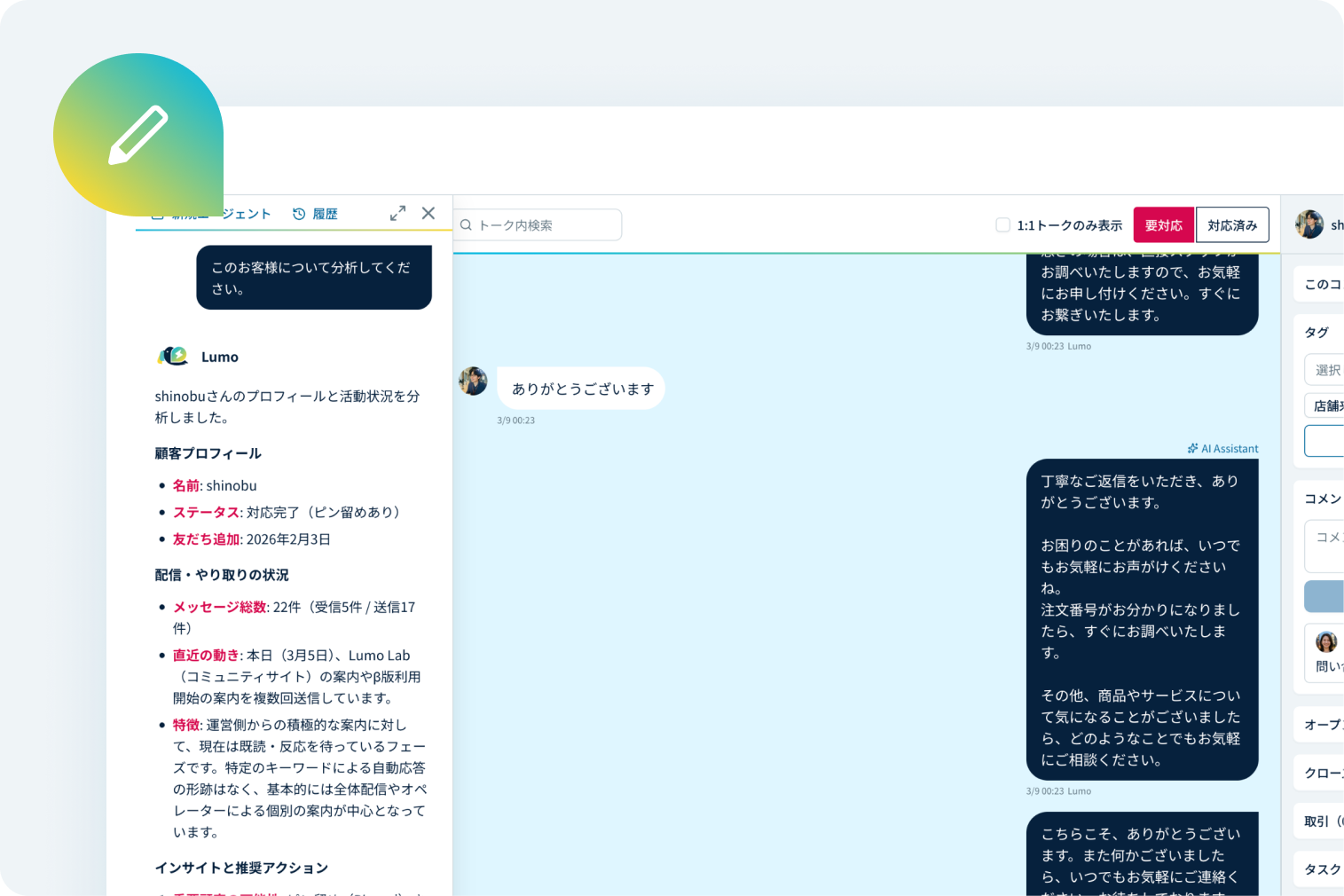
Chat

Lumo AI Agent’s chat interface for analyzing a specific customer’s profile and activity, along with their LINE chat history. 拡大する
Lumo AI Agent’s chat interface for analyzing a specific customer’s profile and activity, along with their LINE chat history.

AI-Powered Chat Composition

Analyze LINE chat history to generate context-aware replies tailored to each customer. Spend less time drafting and more time building relationships.
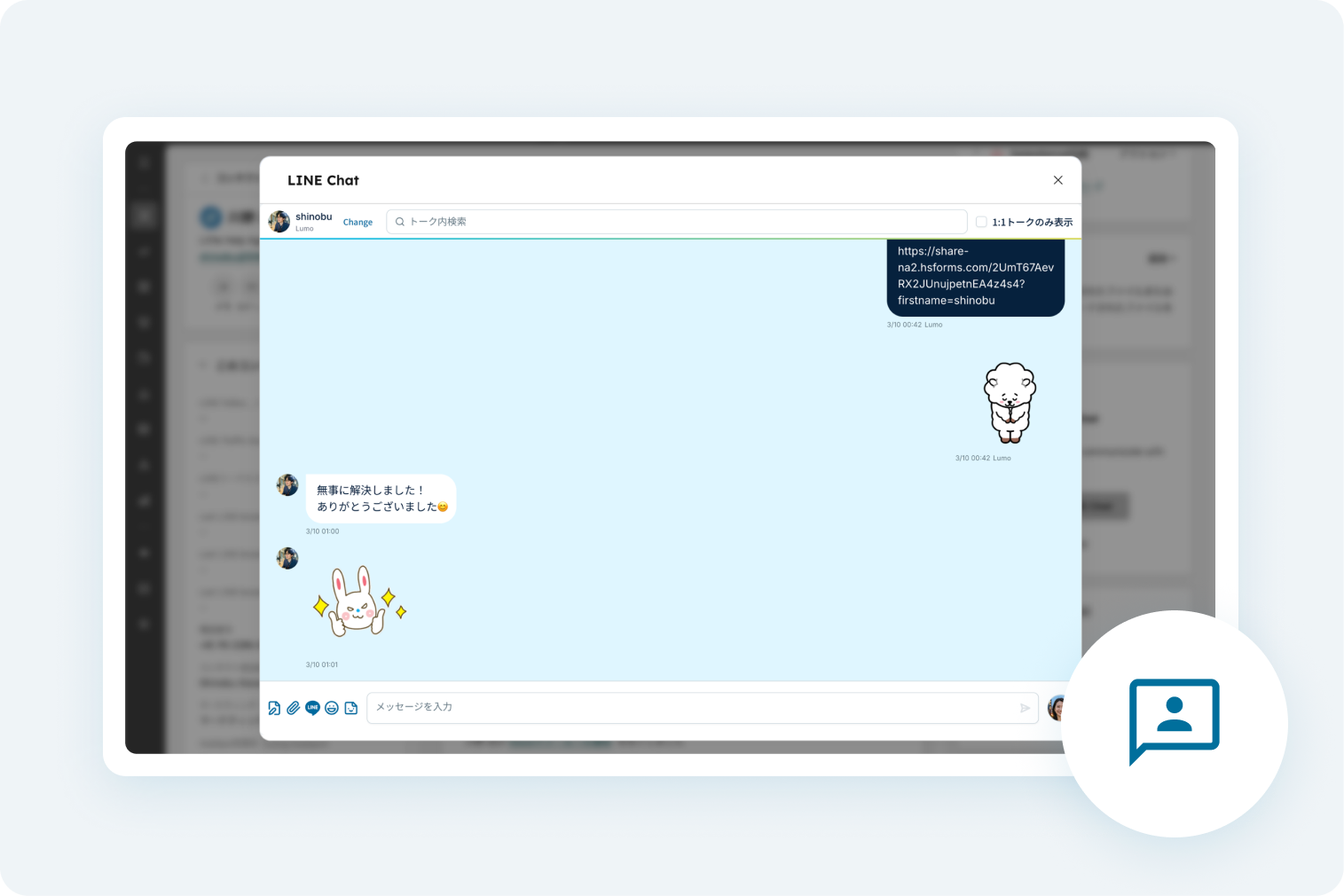
Preview of the LINE Chat conversation screen. 拡大する
Preview of the LINE Chat conversation screen.

1:1 Chat

Engage in 1:1 chats with LINE friends and automatically sync history to Shopify or HubSpot. View all interactions in one unified dashboard.

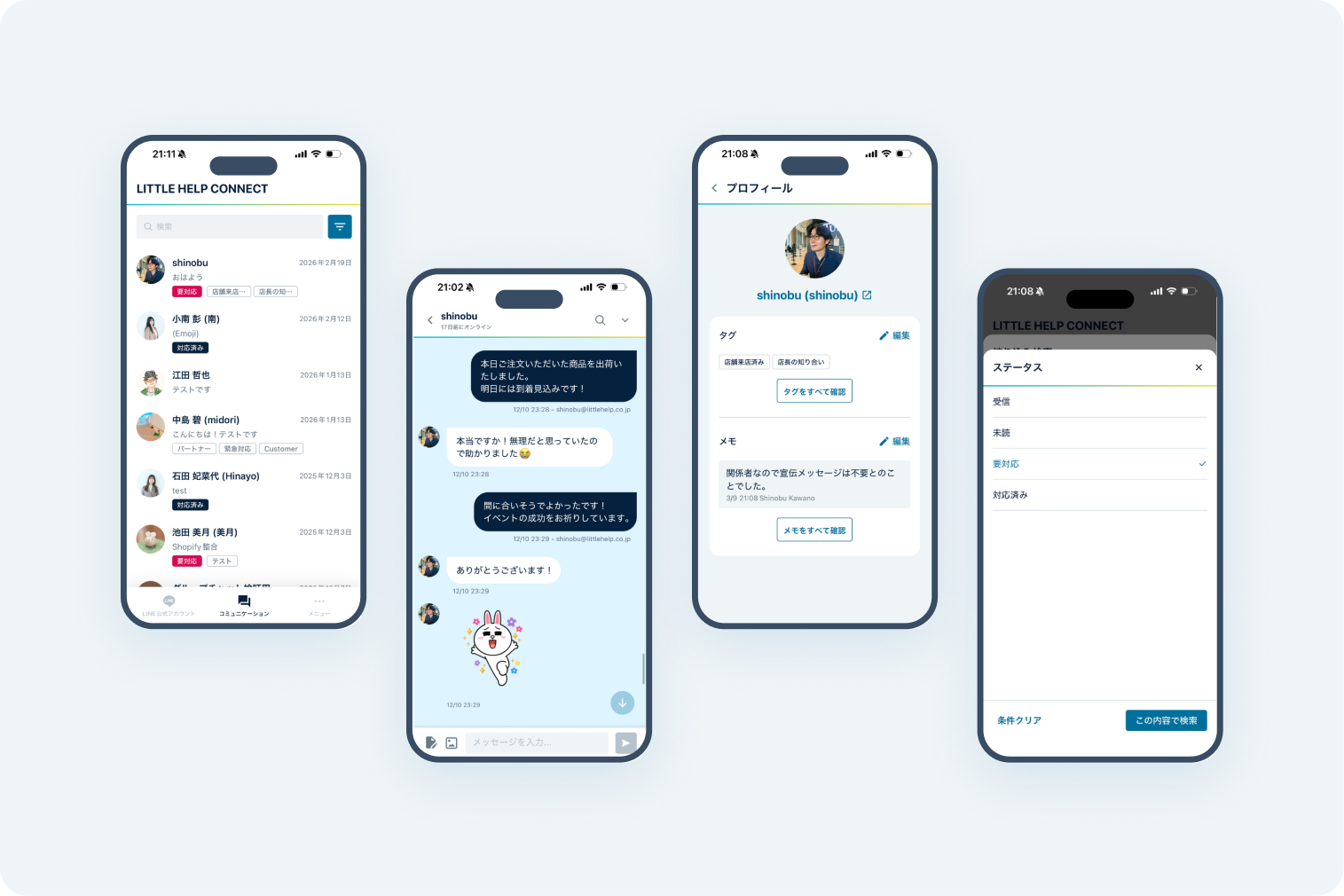
Lumo mobile app screens for friend list, chat, profile, and notes. 拡大する
Lumo mobile app screens for friend list, chat, profile, and notes.

Dedicated Mobile Chat App

Respond to customers instantly on the go. Access user profiles and manage statuses with "Needs Attention" tags directly from your phone.

Integrations

Maximize efficiency with Shopify & HubSpot sync

Shopify × LINE Integration

×
Leverage unified customer data, including purchase history from Shopify and message history from LINE. Manage broadcasts, chat support, and marketing strategies all within Lumo—no more switching between platforms.
Learn more about Shopify Integration

HubSpot × LINE Integration

×
Drive LINE messaging, 1:1 interactions, and automation using customer insights and interaction history stored in HubSpot. From marketing to customer support, empower your LINE strategy with HubSpot data.
Learn more about HubSpot Integration

TRIAL

Get started with a free trial.
Ready to empower your LINE operations with Lumo?

Connect LINE in as little as 5 minutes・
No credit card required!

By signing up, you agree to the following terms.

Security

A proven platform recognized for its technical excellence and reliability.

Lumo is developed by an engineering team with deep expertise in HubSpot, leveraging years of operational insights gained from its predecessor, LITTLE HELP CONNECT. As a certified HubSpot App Partner and LINE Technology Partner, Lumo meets enterprise-level security standards, providing a secure and robust environment for your business.

img-award-tech-communication-advanced

LINE Official Technology Partner

img-award-rising-magenta

HubSpot Certified App Partner

  1. Security 01
    security_01

    Our software is securely operated and hosted on the Google Cloud Platform (GCP).

  2. Security 02
    security_02

    All communications are fully encrypted a protected via SSL technology.

  3. Security 03
    security_03

    Your data is subject to continuous and automated backups to ensure safety.

  4. Security 04
    security_04

    We have received third-party certification for our standards in handling personal information.

  5. Security 05
    security_05

    Data is managed strictly on a per-contract basis and is never utilized for retraining external AI models.

  6. Security 06
    security_06

    AI processing is executed securely within the infrastructure of Google Cloud Vertex AI.

Security Whitepaper Thumbnail 1

Access Our Security Documentation

We ensure that AI agents and customer data are managed securely and in compliance with industry standards.
For more details, please refer to our documentation.

Download Documentation

Pricing Plans

Four scalable tiers to suit
your business size and needs

Start free. Upgrade when you grow.

Free Plan

Free

Free Messages: 200/month

Additional Messages: Not available

  • AI Agent
  • LINE Friend Management
  • Segmented Messaging
  • Step delivery of messages
  • 1:1 Chat
  • Dedicated Mobile Chat App

No credit card

required5-minute setup

Shopify HubSpot

For small and medium-sized businesses

Business Plan

$300 USD/Month

Free Messages: 30,000 messages/month

Additional Messages: $0.015 per message

  • AI Agent
  • All Starter Plan Features
  • Customizable Analytics Reports
  • Customizable Dashboards
  • Priority Customer Support

Best value for

over 21,000 messages/mo
Multi-department ready

Shopify HubSpot

For Scaling Enterprises

Enterprise Plan

$600 USD/Month

Free Messages: 100,000 messages/month

Additional Messages: $0.01 per message

  • AI Agent
  • All Business Plan Features
  • LINE Notification Messages
  • API Integration
  • External AI Agent Integration
  • Priority Customer Support
  • Dedicated Customer Success

Best value for

over 57,000 messages/mo
Built for large-scale operations

Shopify HubSpot

※ Lumo can be used as a standalone LINE marketing tool, even without integrating with Shopify or HubSpot.

TRIAL

Don't hesitate!
Start your free trial and
empower your LINE marketing with Lumo.

Connect LINE in as little as 5 minutes・
No credit card required!

By signing up, you agree to the following terms.

Compare with Other Solutions

AI Smart Agents come standard!
Access full AI
capabilities even on the Basic Plan.

Lumo
Company A
Company B
AI-Powered Message Generation
Subject to Plan Limits
AI-Powered Automation Assistant
Workflow Automation
Usage Limit
AI-Powered Customer Insights & Recommendations
Advanced Plan
AI-Powered Campaign Analysis & Performance Insights
Advanced Plan Required
AI Automated Response
Usage Limit

お客さまの声

実際の利用者様から
満足の声を
多くいただいています

  1. お客さまの声

    友だち追加のタイミングで、診断コンテンツの配信と会員登録の訴求をしています。会員登録をしなかったユーザーへ3日後にリマインドを送ったり、1:1チャットの通知をSlackへ通知を送ったりできるので、機会損失を防げます。

    プログラミングスクールD社

  2. お客さまの声

    今までLINEのタグなどで試行錯誤していた顧客の特定作業が格段に楽に行えます。メールアドレスや電話番号など、さまざまな方法でID連携を行えるので、顧客管理の工数を削減することができました。

    プログラミングスクールD社

Lumo User Community Site: Lumo Lab

Community

Access user manuals and
learn best practices from other users.

Access our feature-specific guides and join the user community. Participation is open to all plan holders, including the Free Plan. Feel free to use this space when you encounter operational challenges or wish to discover tips and tricks from fellow users.

Join Community

LINE Register our
LINE Official Account

Consult with us via LINE regarding 
any pre-installation questions or operational concerns.

qr

※For specific inquiries regarding Lumo installation, please use the contact form on our website.

*This LINE Official Account is available in Japanese only.

FAQ

Frequently Asked
Questions

A

You can start with basic features simply by connecting your LINE Official Account. If you’re unsure about the initial setup or operations, our AI Agent provides real-time support and guides you through the messaging setup on-screen.

A

Yes, Lumo can be used as a standalone tool as long as you have a LINE Official Account. While integrating with Shopify or HubSpot enables advanced data-driven broadcasting and analytics, you can certainly start by focusing on streamlining your LINE operations first.

A

Even on the Free Plan, you can experience Lumo’s core features, including broadcasting, AI chat generation, and operational support. You can evaluate the performance and usability before deciding to upgrade to a paid plan. For details, please refer to our Pricing and Features pages.

A

Some data may be transferable. It depends on the tools and management methods you use, but there are cases where previous data can be integrated into Lumo. Please contact us with your specific situation for further guidance.

A

It can be used for various tasks such as auto-generating copy, analyzing data, proposing marketing strategies, and providing operational support. The more you use it, the better it understands your operational patterns to provide tailored recommendations.

A

No. Lumo will never execute actions without user authorization. Our system is designed so that all content and strategies are reviewed and approved by the user before being sent.

About Lumo

Explore More about Lumo

TRIAL

Get started with a free trial.
Ready to empower
your LINE operations with Lumo?

Connect LINE in as little as 5 minutes・
No credit card required!

By signing up, you agree to the following terms.